Fake Captcha scam is now becoming the fastest growing popular threat across social media platforms in 2026. It is designed to target internet users to verify “I am not a robot” which eventually leads to stalling malware, fake captcha virus and fraudulent activities to user phones or systems.
At first glance, about 50% of the users reports it appears legitimate like a real verification page to protect users data without suspicious activities.
However instead of protecting user information, they download malware to users’ mobile phones after clicking the fake captcha scam, tracking users personal information and gaining an insight to user account details.
Many victims encounter these fake captcha scams when they want to download files, download a movie, click ads online or visit scam websites. Users will be asked to click “i am not a robot” then after the permission is granted a warning sign may appear as a scam alert or direct them to another page entirely.
Because cyber security scams are advanced in user AI to develop a real captcha scam, making it more difficult for users to differentiate between the real and fake captcha virus. Identifying the fake captcha scam is important in order not to fall for the scammer and to protect your personal information.
In this detailed guide you will learn how to identify a fake captcha scam, enlightened to you through the warning sign, what happens if you click the fake one, and how to remove the fake captcha scam from your system.
What Is a Fake CAPTCHA Scam?
Fake captcha scam is designed to mimics a real verification page through robot check in which the users will be asked to verify if you are a human. They also ask users to click ‘win + X” to refresh the pages which will lead to receiving various scam alerts, installing malware, and getting insight on users personal information.
The key difference between a real and fake captcha scam is that the fake one often used unverified sites, using high catchy buttons, and asking users to perform irregular tasks like installing packages, and pressing shortcut verifications.
While a real captcha did not use suspicious websites and often asked users to verify either by playing puzzle games or clicking the verify button.
How the Fake CAPTCHA Scam Works

- Let analyze the above screenshot properly to be able to know how the captcha scam works, Firstly are asked to verify by pressing window + X which is a first step to open users to the scam menu and exposing their systems to fraudulent activities.
- Press 1 or choose terminal or power shell: This involves a terminal in order to run the codes and users’ mobile phones or systems will now accept the commands after running the codes.
- Press ctrl + V: These options are to paste the scam codes already copied in your clipboard to the terminal, and pasting these codes poses different risks to users such as installing malware, tracking user account details and even mobile phones.
- Press enter, by pressing enter users agree to run and update the codes into their systems. Which will eventually lead to redirecting to verify pages, receiving different spam alerts, accessing users details and installing captcha virus to users mobile systems.
It is important to identify how these fake captchas are structured and how it works in order not to fall for these spam and protect your data.
Common Signs of a Fake CAPTCHA Page
- You received a scam alert when clicking the button
- It is directing you to verify websites
- Scam notification pop up
- Asking you to perform unrelated tasks
- You received a warning messages
- Asking you to input personal information to verify “I am not a robot”
- Asking users to install a file in order to verify.
What Happens If You Click the Fake CAPTCHA?
- Lead to installation of captcha virus into users systems
- Installation of malware
- Tracking user application
- Tracking users account information
- System malfunctioning
- Fraudulent activities
- Phishing scams.
How to Remove Fake CAPTCHA Notifications
To remove a fake captcha on chrome, navigate to menu which is the three dots at the tops right of the pages, then go to settings, there are different options available, you will choose the security or privacy options then to notifications, after navigating to the notification bar search for any related notification like captcha then you remove or block the notification entirely. This is also applicable to androids users, Iphone or systems.
How to Protect Yourself From Fake CAPTCHA Scams
- Do not continue with the verification if you notice a suspicious activity
- Protect your phone with antivirus
- Do not install any packages in your terminal
- Do not press any win + r in order to download a very you are a human
- Avoid downloading fake sites
- Do not input your personal information for verification process
- Do not install a file or codes that is not verify
- Updates your browse to detect anu suspicious activities
- Remove the fake captcha scam messages from your from your mobile application
- Navigate to your setting to not download unverified applications.
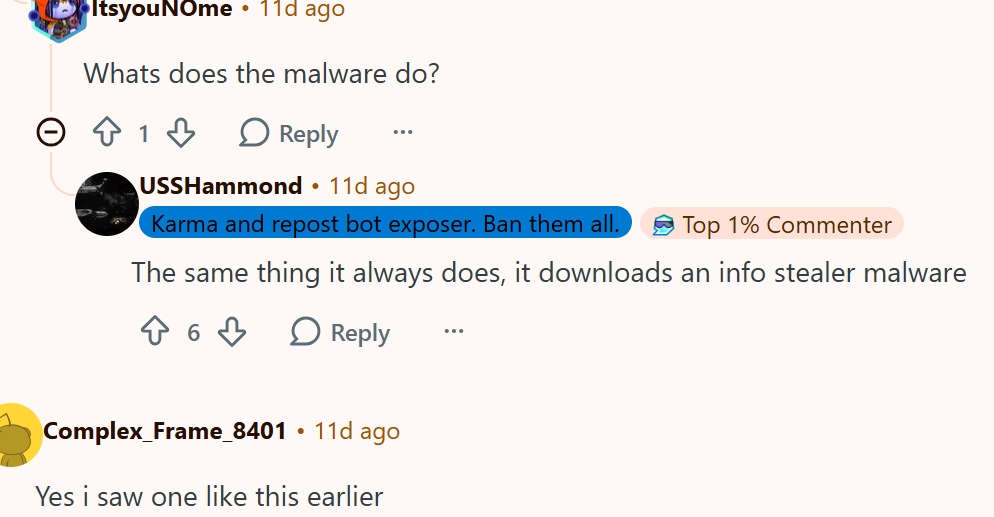
Real users experience with fake CAPTCHA


Conclusion:
Fake scam is now becoming rampant in 2026 as the scammers ae now developed strategies that mimic real verification pages.
This is to deceive users to download malware into their mobile phones, track tier information and perform unwise activities.
To protect yourself from the scammer, avoid clicking suspicious verification pages that are asking you to install codes or files before verifications.
FAQs
Is fake CAPTCHA a virus?
Yes it is a virus designed to install all forms of malfunction to victims that click this “i am not a robot scam”. Which can eventually lead to gaining access to users’ information.
Can fake CAPTCHA hack my phone?
Yes, a fake captcha can hack your phone and track the user’s personal information.
How do I remove fake CAPTCHA popups?
As discussed above, navigate to your chrome browsers, click the three dot menu at the tops, then go to settings to remove the suspicious notifications.
Is Cloudflare CAPTCHA safe?
Yes Cloudflare captcha is a safe and legit verification process without asking users to perform unwholesome tasks.
Disclaimer
This article is for educational and awareness purposes only. While we strive to provide accurate information based on research and public opinions, readers should verify from official authorities and reliable cybersecurity before taking any security related actions.
Related post
I Received a Payment Email But No Money – Is It a Scam?
Fake PayPal Payment Email Scam Explained